Application layer
The Business layer says what the enterprise does and offers. The Application layer says what software supports it — the components that run the business, the services those components expose, and the data they act on. This is the layer developers live in, and the discipline of ArchiMate here is almost entirely about not collapsing four different ideas — component, service, collaboration, data object — into the one word "system."
This page pins those four down, builds the Cadence Cycles application landscape, and then draws the view that is the whole reason the layer exists: the one that shows each customer-facing business service realised in software.
What the Application layer captures
- Active structure — application components: a deployable, replaceable piece of software (the POS, the storefront, the OMS). What the software is.
- Behaviour — application services: the externally-visible behaviour a component exposes, named for what it does (Take Payment, Check Inventory). What the software offers.
- Collaboration & interaction — an application collaboration: two or more components that jointly deliver behaviour neither owns alone.
- Passive structure — data objects: the information the components read and write (Order, Product). What the software acts on.
In the TOGAF ADM this is Phase C — Application Architecture (the systems half; the data half is the sibling Data Architecture). Its job is to answer each Business-layer process step and service with the software that supports it — and to expose duplication and gaps while doing so.
Component vs service — the distinction to get right
An application component is a thing you can deploy: a bounded, independently replaceable piece of software. "POS System." "Ecommerce Platform." "Order Management System (OMS)." An application service is behaviour that component exposes to the outside, named from the consumer's point of view: "Take Payment," "Check Inventory," "Manage Order."
The reason to separate them is the same reason capability beats org box and business service beats process: it decouples the contract from the implementation. "Take Payment" is a stable service the checkout depends on; whether it is realised today by an external Payment Gateway and tomorrow by a different provider is invisible to everyone consuming it. Model the service, wire the business to the service, and you can re-platform the component underneath without re-drawing the enterprise. A component realises one or more services; a service hides exactly one thing — how.
Collaboration and data object
An application collaboration is the case where a piece of behaviour is delivered by two or more components together — no single one owns it. Cadence's in-store checkout is really a collaboration between the POS System and the external Payment Gateway; here we keep the model simple and represent the shared behaviour as the Take Payment service both rely on, but when a piece of value genuinely has no single owning component, the collaboration is the honest way to model it (and it is what stops an architecture from pretending every capability lives in exactly one box).
A data object is the passive counterpart: a coherent unit of information the components act on — "Order," "Product," "Inventory Record," "Customer Profile." A component accesses a data object (reads, writes, or both). Data objects are where the omnichannel thesis gets teeth: the Motivation-layer requirement "unified customer profile" is, at this layer, a single Customer Profile data object that the CRM owns and the Ecommerce Platform reads — one record, not two channels each with their own copy.
The Cadence Cycles application landscape
The application cooperation view is the systems inventory with its wiring: the components in the middle, the services they expose on the right, and the data they act on to the left. Read a component outward in both directions — what it offers and what it touches — and the shape of the estate falls out.
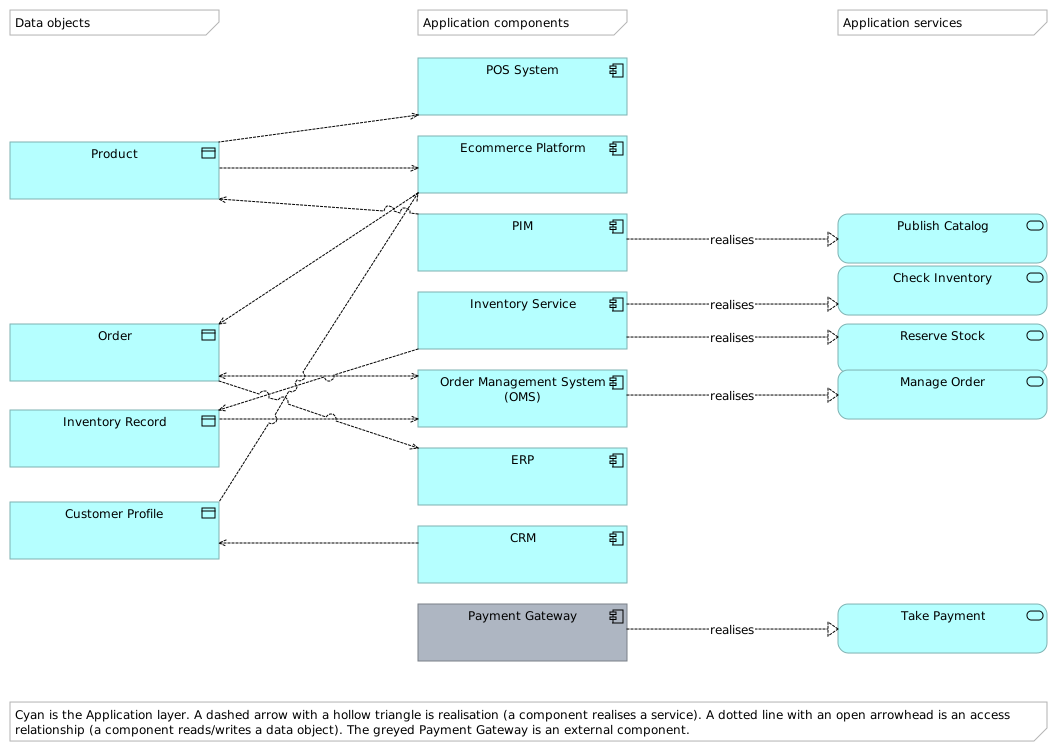
The Cadence Cycles application landscape — an authentic Archi export. Cyan is the Application layer. A dashed arrow with a hollow triangle is realisation (a component realises a service); a dotted line with an open arrowhead is an access relationship (a component reads or writes a data object). The greyed Payment Gateway is an external component — someone else's software, consumed as a service.
Three things worth reading off it. First, the back office exposes the services, the front office consumes them: the Inventory Service, OMS, PIM (product information management) and the external Payment Gateway realise the five application services, while the customer-facing POS System and Ecommerce Platform mostly use those services and read/write data. Second, Order is shared — the Ecommerce Platform writes it, the OMS reads and writes it, and the ERP (enterprise resource planning) reads it for the books: one data object, three components, which is exactly the kind of shared master an omnichannel programme must get right. Third, the two systems of record — ERP and CRM (customer relationship management) — sit at the edges, deliberately: the constraint "ERP replacement out of scope this cycle" from the Motivation layer is visible here as a component everything integrates around rather than through.
The application-usage view: the business, realised in software
This is the view the whole layer builds toward, and the one to put in front of a business stakeholder. It is deliberately just two tiers: the business services the customer actually receives (yellow, top) and the application services that support them (cyan, bottom). Every arrow is a serving relationship pointing up — from software to the business behaviour it makes possible.
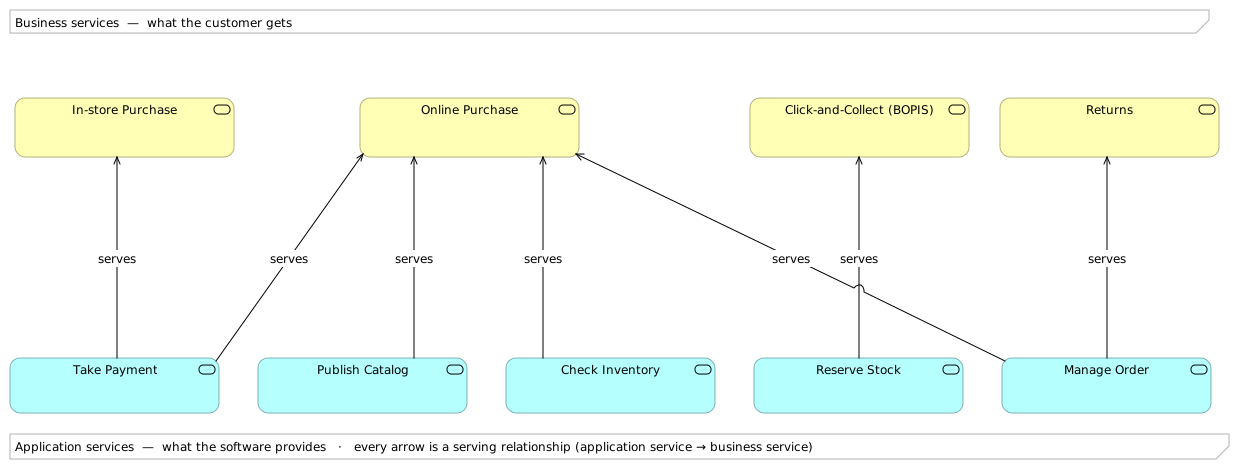
How the business is realised in software — an authentic Archi export. Yellow is the Business layer, cyan the Application layer; every arrow is an application service → business service serving relationship. Read a business service downward to see the software it rests on.
The lesson is in the fan. Online Purchase is held up by four application services at once — Publish Catalog, Check Inventory, Manage Order, and Take Payment — which is a one-picture statement of why an online channel is so much more software-intensive than a shop floor: In-store Purchase leans on just Take Payment (a card terminal and a till), while the digital equivalent needs a catalogue, live stock, an order engine, and payments to all work together. And the Warranty service is deliberately absent from the bottom tier — nothing in software serves it — which is the diagram honestly admitting a manual, un-automated process, and a candidate for the roadmap.
This view is a two-way contract
Read top-down, it answers the business question "what runs our Online Purchase, and what breaks it if it fails?" Read bottom-up, it answers the engineering question "if we retire the OMS, which customer-facing services do we put at risk?" (Online Purchase and Returns — trace Manage Order upward). The same serving edges, drawn once, settle both the change-impact and the resilience conversations — which is why the application-usage view, not the component inventory, is the one that earns its keep.
So what — which decision this drives
The application layer turns "do we have too many systems?" into an analysis you can defend. The cooperation view exposes duplication and single points of failure (one Payment Gateway behind every sale; one Inventory Service behind both Check Inventory and Reserve Stock); the usage view exposes where the business is and isn't supported (four services behind Online Purchase, nothing behind Warranty). Together they tell Cadence where to invest — harden the Inventory Service, automate Warranty — before a line of code is written, and they hand the next layer down a precise question: what does each of these components actually run on?
Where to go next
- Technology — answer that last question: the nodes, system software, networks, and artifacts these components run on, and the infrastructure-usage view that shows where each one lives.
- Business — the services, processes, and value streams these application services exist to support.
- Strategy — the capabilities (Ecommerce, Order Fulfilment, Inventory Management) these systems ultimately realise.